
High-Speed Batch Exporter
Instant Multi-Format Drawing Output for Production
The High-Speed Batch Exporter serves as your Precision Production Engine, automating the labor-intensive conversion of Inventor drawings into industry-standard formats. By merging complex documentation into professional deliverables, it streamlines your entire fabrication and delivery workflow.
Core Benefits
Precision Output Generation
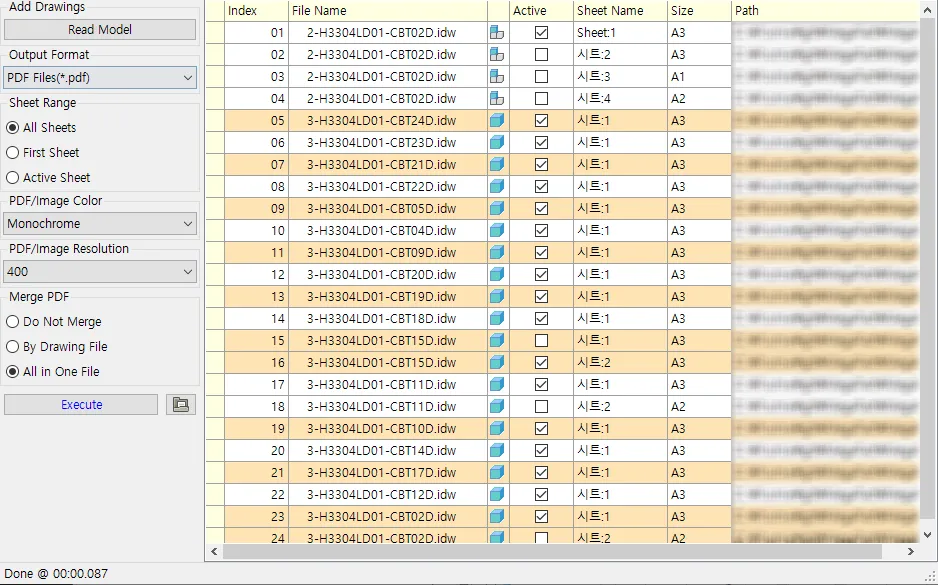
Convert your entire drawing library into multiple formats simultaneously, with full control over color mode and DPI so every export meets your documentation standards.
Print-Ready Deliverables
Consolidate massive drawing sets into a single, high-quality merged PDF for seamless project review and bulk printing.
Universal Industry Compatibility
Ensure seamless collaboration by providing drawings in the exact formats required—PDF for review and AutoCAD® DWG/DXF for CNC and fabrication.
Automatic Drawing Discovery
Click Read Model to instantly scan the loaded assembly and match drawings to their corresponding components by filename, saving you from hunting down each file by hand.
Precision Output
- Simultaneous Multi-Format Export
- Check any combination of AutoCAD® DWG, DXF, DWF, DWFx, PDF, PNG, JPG, and TIFF, and export every selected drawing to all of them in one synchronized pass.
- Professional DPI Control
- Generate high-resolution visual assets with customizable DPI settings, perfect for high-end technical manuals and marketing archives.
- Smart PDF Merging
- Combine multiple sheets into a single, intelligently ordered PDF document that serves as your project’s “Single Source of Truth.”
Production Intelligence
- Flexible Sheet Range Control
- Export only the active sheet, just the first sheet, or every sheet in each drawing, giving you precise control over exactly what gets delivered.
- AutoCAD® DWG Compatibility
- Every DWG export is generated in the universal AutoCAD® DWG format—pure 2D geometry that any CAD or CNC software can open, with no dependency on Inventor or its native model data.
- Smart Drawing Retrieval
- Reading the model automatically matches and lists drawings that share a filename with their assembly components, so you spend less time searching and more time exporting.
Other Features
Unified iProperty Editor
Take full control of your metadata. Master the iProperties of your loaded model from a single, centralized grid view. Effortlessly batch-edit hundreds of properties across the entire assembly at once, ensuring 100% data consistency while eliminating hours of manual entry.
Configure iProperties
The Configure iProperties menu serves as your central control hub, allowing you to manage and customize which metadata fields are displayed and edited within the interface.
Smart Assembly Renamer
Automate your file organization with surgical precision. Safely rename complex assembly structures while protecting all internal file references. MegaPart ensures that your drawings and components stay perfectly linked without the risk of broken paths or lost data.
Intuitive Reference Viewer
Diagnose every file dependency instantly. Automatically scan the loaded assembly to detect broken links, missing references, and orphaned OLE links before they cause problems. Repair, relocate, or remove problematic references directly, all without ever leaving Inventor.
Instant Template Replacer
Standardize your project documentation instantly. Automatically swap title blocks and borders for all associated drawings within the loaded assembly. Ensure every sheet reflects your latest company standards and layer settings with zero manual effort required.
Start Your 15-Day Free Trial
Join innovative engineering teams who trust MEGAPART to automate repetitive CAD management, maintain data precision, and accelerate project delivery.