
Intuitive Reference Viewer
Complete Visibility and Instant Repair for File Dependencies
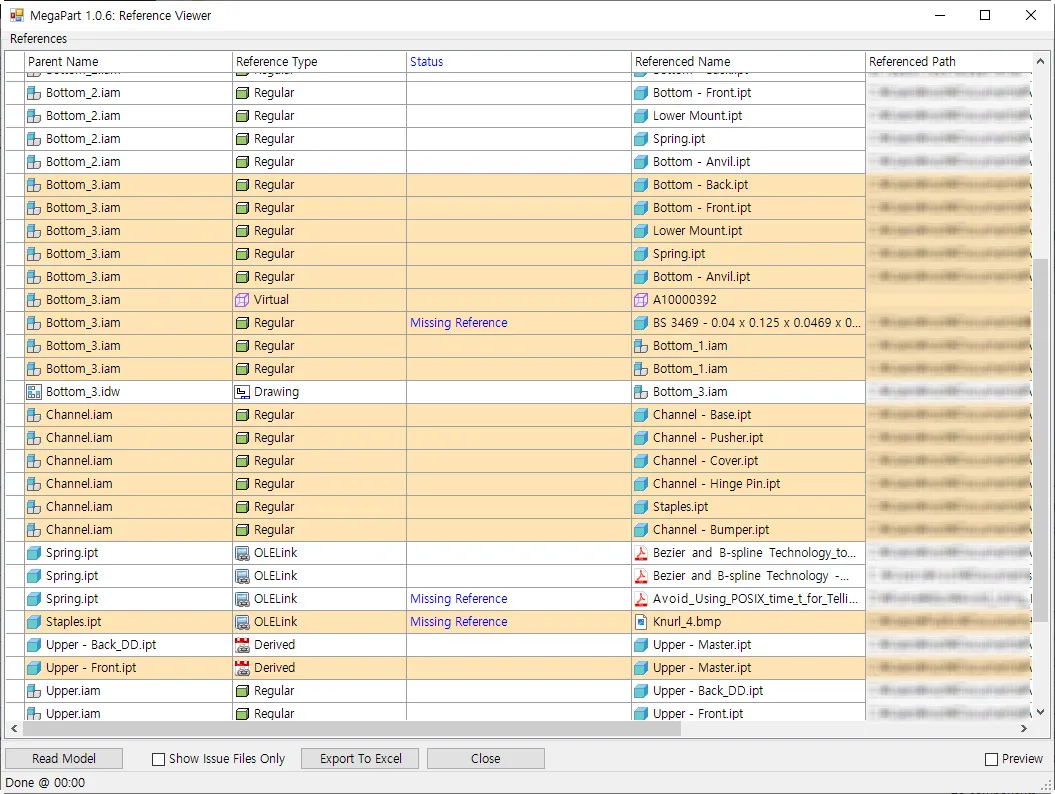
The Intuitive Reference Viewer serves as your project’s dependency command center, mapping every link between parts, assemblies, and drawings on a single screen. It flags broken or missing references before they cause costly downstream problems, keeping your entire project structure sound and audit-ready.
Core Benefits
Disk-Verified Issue Detection
Every reference is checked against the actual file on disk, not just Inventor’s internal status, so broken and missing links are never missed.
In-Place Reference Repair
Relink, move, or copy problem references directly from the list, without ever having to track down files manually outside Inventor.
Exportable Dependency Reports
Capture the full dependency map, including your own Status notes, and export it to Excel for documentation, auditing, or team review.
Universal Reference Coverage
Diagnose every connection type at once – assembly occurrences, derived parts, drawings, OLE links, AnyCAD, and Virtual Components – from a single unified view.
Repair Tools
- Relink Reference
- Point a broken link to a new target file in seconds when a source file has been renamed or moved outside MegaPart.
- Move / Copy Reference
- Relocate a referenced file to a new folder with the link updated automatically, or copy it instead to keep the original intact for assemblies that still depend on it.
- Bulk Missing & OLE Cleanup
- Select multiple rows at once to delete every missing reference or unwanted OLE link in a single operation, with a full count of what was removed.
Diagnostic Intelligence
- Show Issue Files Only
- Filter the full dependency tree down to just the files that need attention, so you can focus on fixing problems instead of scanning hundreds of healthy links.
- Type-Aware Safeguards
- Automatically protects shared Content Center libraries and AnyCAD references from unsafe move or relink operations, while still allowing safe copy actions where appropriate.
- Live Status Tracking
- Add custom notes directly on each reference as you investigate, and carry those notes straight through to your Excel export for team hand-off.
Other Features
Unified iProperty Editor
Take full control of your metadata. Master the iProperties of your loaded model from a single, centralized grid view. Effortlessly batch-edit hundreds of properties across the entire assembly at once, ensuring 100% data consistency while eliminating hours of manual entry.
Configure iProperties
The Configure iProperties menu serves as your central control hub, allowing you to manage and customize which metadata fields are displayed and edited within the interface.
Smart Assembly Renamer
Automate your file organization with surgical precision. Safely rename complex assembly structures while protecting all internal file references. MegaPart ensures that your drawings and components stay perfectly linked without the risk of broken paths or lost data.
Instant Template Replacer
Standardize your project documentation instantly. Automatically swap title blocks and borders for all associated drawings within the loaded assembly. Ensure every sheet reflects your latest company standards and layer settings with zero manual effort required.
High-Speed Batch Exporter
Accelerate your final project delivery with a powerful export solution. Simultaneously convert all associated drawings into professional AutoCAD DWG, PDF, and High Quality Image formats to ensure fast and consistent delivery.
Start Your 15-Day Free Trial
Join innovative engineering teams who trust MEGAPART to automate repetitive CAD management, maintain data precision, and accelerate project delivery.