
Instant Template Replacer
Automated Drawing Standardization
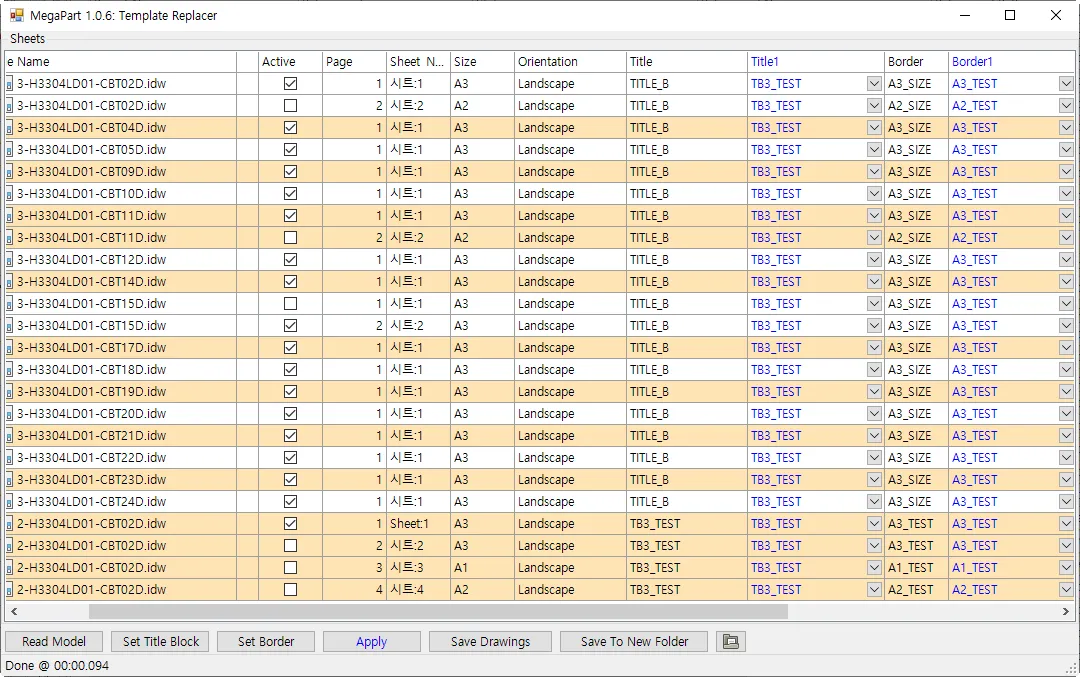
The Instant Template Replacer serves as your global formatting engine, allowing you to update and replace drawing templates and title blocks across your entire project. It ensures that every technical drawing adheres to the latest company standards and title block requirements, eliminating the need for manual reformatting.
Core Benefits
Instant Standardization
Achieve a uniform look across all associated drawings by swapping old templates with new ones in a single automated process.
Effortless Setup Replication
Save time by leveraging copy-paste workflows for replacement settings, ensuring immediate setup for new drawing sets.
Rapid Brand Updates
Effortlessly update company logos, title blocks, and border styles across your entire library when corporate standards change.
Error-Free Documentation
Eliminate the risk of using outdated templates, ensuring 100% compliance with current engineering standards through precise manual configuration.
Template Mastery
- Bulk Template Swapping
- Replace existing IDW or DWG templates for thousands of drawing files simultaneously while strictly preserving all existing views, dimensions, and annotations.
- Smart Mapping Engine
- Quickly duplicate template replacement rules between drawings using Smart Copy & Paste, eliminating repetitive manual configuration for complex drawing sets.
- Granular Configuration Control
- Maintain total oversight of your template settings before execution, ensuring every title block and border is mapped exactly to your requirements.
Sheet Intelligence
- Title Block & Border Sync
- Automatically swap out both title blocks and borders based on predefined rules while mapping component iProperties into the new template instantly.
- Non-Destructive Formatting
- Maintain original sheet sizes and orientations while updating background elements, ensuring your professional design layout remains perfectly undisturbed.
- Dynamic Style Updates
- Synchronize layer settings and text styles across multiple files to ensure that every drawing in the assembly speaks the same visual language.
Other Features
Unified iProperty Editor
Take full control of your metadata. Master the iProperties of your loaded model from a single, centralized grid view. Effortlessly batch-edit hundreds of properties across the entire assembly at once, ensuring 100% data consistency while eliminating hours of manual entry.
Configure iProperties
The Configure iProperties menu serves as your central control hub, allowing you to manage and customize which metadata fields are displayed and edited within the interface.
Smart Assembly Renamer
Automate your file organization with surgical precision. Safely rename complex assembly structures while protecting all internal file references. MegaPart ensures that your drawings and components stay perfectly linked without the risk of broken paths or lost data.
Intuitive Reference Viewer
Diagnose every file dependency instantly. Automatically scan the loaded assembly to detect broken links, missing references, and orphaned OLE links before they cause problems. Repair, relocate, or remove problematic references directly, all without ever leaving Inventor.
High-Speed Batch Exporter
Accelerate your final project delivery with a powerful export solution. Simultaneously convert all associated drawings into professional AutoCAD DWG, PDF, and High Quality Image formats to ensure fast and consistent delivery.
Start Your 15-Day Free Trial
Join innovative engineering teams who trust MEGAPART to automate repetitive CAD management, maintain data precision, and accelerate project delivery.